

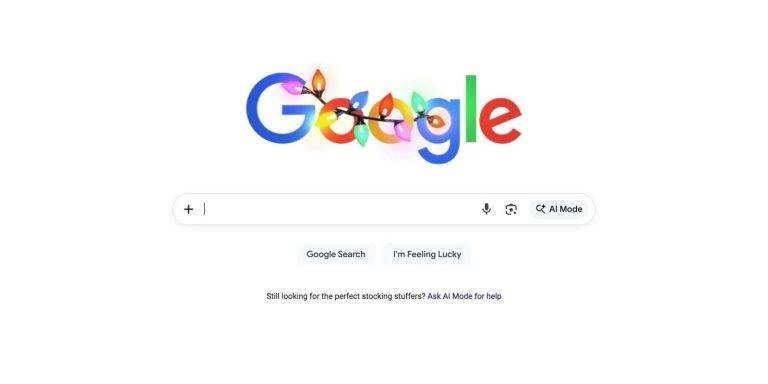
Google has updated the google.com desktop homepage by replacing the traditional magnifying-glass search icon with a new “plus” menu, allowing users to quickly upload images and files directly from the search bar—features that align with the company’s ongoing AI integration in Search, particularly with AI Mode and AI Overviews, though the upload capabilities themselves aren’t new. This change emphasizes task-oriented search interactions and reflects Google’s broader trend toward blending traditional search with AI-driven tools.
Sources: SlashDot, Seround Table
Key Takeaways
– Google replaced the classic search magnifying-glass icon on its desktop homepage with a plus menu that centralizes image and file upload options.
– Though upload options already existed, this new placement signals stronger integration with AI Mode and AI Overviews in search workflows.
– The update is currently only on desktop web and reflects Google’s broader strategy to make AI features more prominent in everyday search.
In-Depth
Google’s decision to swap out the familiar magnifying glass for a plus menu on its desktop search homepage is more than just a visual tweak—it underscores the company’s strategic shift toward AI-centric search experiences that go beyond traditional keyword queries. On the surface, the change might seem minor: clicking the new plus icon lets users upload an image or file directly from the search bar, a capability that many users could already access through other parts of Google Search. But placing these upload tools front and center indicates that Google wants to encourage searchers to bring rich inputs like images and documents into their queries, feeding directly into AI Mode workflows and generative summaries like AI Overviews. These features blur the line between classic search and AI-assisted discovery.
From a broader perspective, this update is part of a pattern we’re seeing throughout 2025: Google increasingly weaves AI features into core products rather than confining them to optional labs or experimental flags. For example, earlier in the year, Google introduced AI Mode as an alternate way to interact with search results, offering conversational and synthesized responses. The new plus menu complements that by making upstream integration of user files easier, effectively lowering the friction for AI-augmented searches. It’s also telling that the rollout is currently limited to desktop web; mobile experiences often lag behind or differ due to UI constraints, and Google may be testing adoption and behavior before wider deployment.
Critically, this move may carry mixed implications for users and publishers alike. On one hand, it gives people more ways to engage with search results and inject their own context into queries, potentially yielding faster and more personalized insights. On the other hand, by steering users toward AI-driven experiences, Google keeps traffic within its ecosystem and may further diminish the role of traditional links and organic content in the search experience. For users who prefer straightforward link-based search results, this could feel like another step toward a walled garden where AI summaries replace clicks through to external sources. Furthermore, the prominence of upload and AI features on the main search page advocates for a future where AI is not just an add-on but the default mode of search interaction, influencing how information is discovered and consumed online. Overall, the plus menu is a small UI change, but it signals a bigger philosophical shift at Google—one that prioritizes AI integration and user inputs over the simplicity of classic search.