

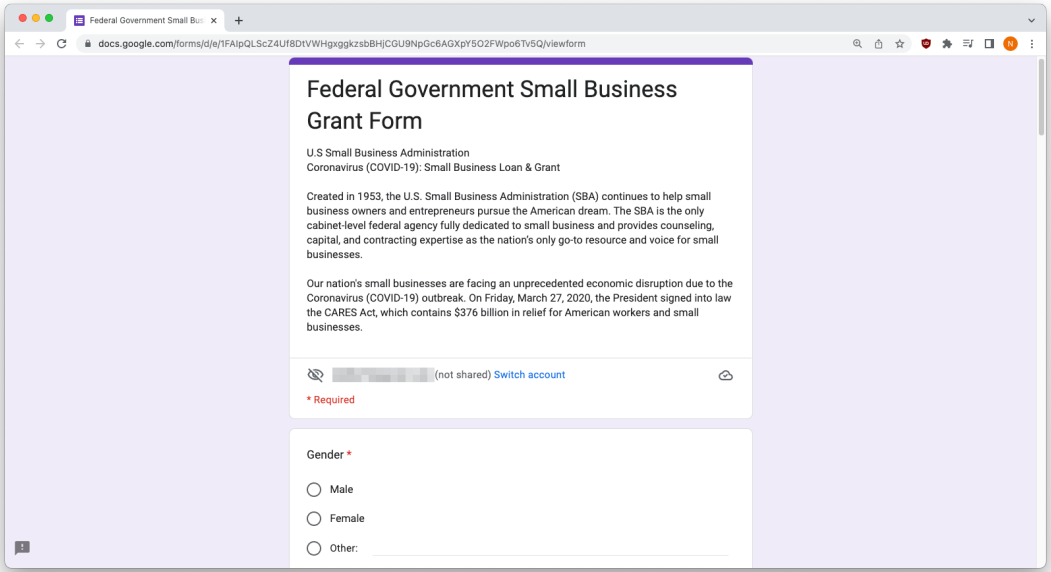
Scammers are increasingly exploiting the trusted appearance and infrastructure of Google Forms—those legitimate surveys and questionnaires—by crafting fake, phishing forms that seemingly originate from reputable sources like universities, banks, or crypto exchanges. These deceptive forms are embedded in emails that appear official, urging users to submit sensitive credentials, payment information, or even approve mock transactions, often bypassing standard email filters thanks to Google’s domains. Experts warn that users should heed warning messages like “never submit passwords” on forms, verify suspicious requests independently (such as by calling the supposed sender), and report phishing via the built-in Report button.
Sources: Wired, Kaspersky, TechRadar
Key Takeaways
– Scammers are hijacking the credibility of Google Forms to deliver phishing campaigns that slip past email security.
– Always look for form‑based warnings (like “never submit passwords”) and verify requests through a different channel before acting.
– Tools like spam filters, trusted security software, and phishing-report features are your best defenses against these increasingly common scams.
In-Depth
Phishing schemes abusing Google Forms have become a particularly worrisome trend in digital fraud. What makes these scams effective is the illusion of legitimacy. Because the forms are hosted on Google’s servers and include ‘docs.google.com’ URLs, they appear completely harmless—so much so that traditional email filters and malware scanners often fail to flag them. This credibility is exploited by scammers who disguise malicious forms as credible requests from your school, workplace, or bank.
In one recent case, scammers sent an email that appeared to be from a university’s administration, with a Google Form requesting login credentials to “verify” access—credential harvesting disguised as routine paperwork. Another nefarious use of the platform targets cryptocurrency owners. Kaspersky revealed a clever scheme in which scammers submit your email address into a Google Form themselves, prompting an automated form‑submission email that looks like a payment notification from a crypto exchange. The email typically urges you to complete a transaction before it “expires,” leading you to a fake exchange site, where you’re tricked into paying a bogus commission or sharing sensitive wallet information.
These scams usually rely on urgency—fear of missed transfers or deadlines—so they push people toward immediate action. That’s why simple vigilance goes a long way. First off, be suspicious of any request that asks for login credentials, payment, or financial verification through a Google Form. Legitimate organizations typically direct you to secure, original portals—not third‑party form builders. Always check for the “never submit passwords” or “not endorsed by Google” text at the bottom of forms; they’re a hint that you might be on a real page—but if that’s missing, take a step back.
When in doubt, verify the request via a trusted channel, like calling your bank or school directly—don’t reply to the email. If you suspect a form is malicious, use the built‑in Google “Report” or “Submit Abuse” link at the bottom of the form to help Google take action.
Moreover, reputable security tools—such as browser extensions or antivirus suites—can often identify phishing pages and warn you before you enter anything.
If you think you’ve submitted personal info to a scam, act quickly: change the affected passwords, enable two-factor authentication where possible, and notify any relevant institutions (e.g., your bank or IT department). And it’s not a bad idea to educate friends and relatives too—spreading awareness reduces the odds that someone will fall victim.
In sum, these scams leverage Google’s trusted services to bypass filters and prey on our trust. But with cautious habits—checking form disclaimers, verifying requests independently, employing security tools, and using the Report function—you can protect yourself without complicating your digital life.