

Close Menu

    Subscribe to Updates

    Get the latest creative news from FooBar about art, design and business.

    What's Hot

    AI Safety Researcher Resigns, Warns ‘World Is in Peril’ Amid Broader Industry Concerns

    February 15, 2026

    Amazon’s Eero Signal Introduces Cellular Backup for Home Internet Outages

    February 15, 2026

    Microsoft Warns Hackers Are Exploiting Critical Zero-Day Bugs Targeting Windows, Office Users

    February 15, 2026
    Facebook X (Twitter) Instagram
    • Tech
    • AI News
    • Get In Touch
    Facebook X (Twitter) LinkedIn
    TallwireTallwire
    • Tech

      Amazon’s Eero Signal Introduces Cellular Backup for Home Internet Outages

      February 15, 2026

      AI Safety Researcher Resigns, Warns ‘World Is in Peril’ Amid Broader Industry Concerns

      February 15, 2026

      OpenAI Disbands Mission Alignment Team Amid Internal Restructuring And Safety Concerns

      February 14, 2026

      Startup’s New Chip Tech Aims to Make Luxury Goods Harder to Fake

      February 14, 2026

      Microsoft Exchange Online’s Aggressive Filters Mistake Legitimate Emails for Phishing

      February 13, 2026
    • AI News

      Amazon’s Eero Signal Introduces Cellular Backup for Home Internet Outages

      February 15, 2026

      AI Safety Researcher Resigns, Warns ‘World Is in Peril’ Amid Broader Industry Concerns

      February 15, 2026

      Amazon Eyes Marketplace to Let Publishers Sell Content to AI Firms

      February 15, 2026

      OpenAI Disbands Mission Alignment Team Amid Internal Restructuring And Safety Concerns

      February 14, 2026

      Startup’s New Chip Tech Aims to Make Luxury Goods Harder to Fake

      February 14, 2026
    • Security

      AI Safety Researcher Resigns, Warns ‘World Is in Peril’ Amid Broader Industry Concerns

      February 15, 2026

      Microsoft Warns Hackers Are Exploiting Critical Zero-Day Bugs Targeting Windows, Office Users

      February 15, 2026

      Microsoft Exchange Online’s Aggressive Filters Mistake Legitimate Emails for Phishing

      February 13, 2026

      China’s Salt Typhoon Hackers Penetrate Norwegian Networks in Espionage Push

      February 12, 2026

      Reality Losing the Deepfake War as C2PA Labels Falter

      February 11, 2026
    • Health

      Amazon Pharmacy Rolls Out Same-Day Prescription Delivery To 4,500 U.S. Cities

      February 14, 2026

      AI Advances Aim to Bridge Labor Gaps in Rare Disease Treatment

      February 12, 2026

      Boeing and Israel’s Technion Forge Clean Fuel Partnership to Reduce Aviation Carbon Footprints

      February 11, 2026

      OpenAI’s Drug Royalties Model Draws Skepticism as Unworkable in Biotech Reality

      February 10, 2026

      New AI Health App From Fitbit Founders Aims To Transform Family Care

      February 9, 2026
    • Science

      XAI Publicly Unveils Elon Musk’s Interplanetary AI Vision In Rare All-Hands Release

      February 14, 2026

      Elon Musk Shifts SpaceX Priority From Mars Colonization to Building a Moon City

      February 14, 2026

      NASA Artemis II Spacesuit Mobility Concerns Ahead Of Historic Mission

      February 13, 2026

      AI Agents Build Their Own MMO Playground After Moltbook Ignites Agent-Only Web Communities

      February 12, 2026

      AI Advances Aim to Bridge Labor Gaps in Rare Disease Treatment

      February 12, 2026
    • People

      Google Co-Founder’s Epstein Contacts Reignite Scrutiny of Elite Tech Circles

      February 7, 2026

      Bill Gates Denies “Absolutely Absurd” Claims in Newly Released Epstein Files

      February 6, 2026

      Informant Claims Epstein Employed Personal Hacker With Zero-Day Skills

      February 5, 2026

      Starlink Becomes Critical Internet Lifeline Amid Iran Protest Crackdown

      January 25, 2026

      Musk Pledges to Open-Source X’s Recommendation Algorithm, Promising Transparency

      January 21, 2026
    TallwireTallwire
    Home»Tech»Windows 11 Rolls Out Long-Overdue Taskbar Upgrade for Multi-Monitor Users
    Tech

    Windows 11 Rolls Out Long-Overdue Taskbar Upgrade for Multi-Monitor Users

    Updated:December 25, 20253 Mins Read
    Facebook Twitter Pinterest LinkedIn Tumblr Email
    Windows 11 Rolls Out Long-Overdue Taskbar Upgrade for Multi-Monitor Users
    Windows 11 Rolls Out Long-Overdue Taskbar Upgrade for Multi-Monitor Users
    Share
    Facebook Twitter LinkedIn Pinterest Email

    Microsoft has begun rolling out a widely requested feature in Windows 11: the ability to open the Notification Center from non-primary (secondary) monitors. Until now, users with multiple displays had to drag their cursor back to the main monitor to access notifications or the calendar. This change comes as part of update KB5065789, in the September 2025 non-security preview, and it restores parity in taskbar interactivity across screens. In addition to that, the update brings enhancements like a full clock with seconds in the Notification Center, new AI actions in File Explorer, and more customizable on-screen hardware indicators. The feature had already been tested in Insider builds such as 26200.5722 and was based largely on user feedback and frustration with the earlier limitations.

    Sources: Windows Latest, Windows Central

    Key Takeaways

    – Multi-monitor support gets a boost: users can now click the date/time area in the taskbar on any connected display to open the Notification Center, not just on the primary screen.

    – The update reintroduces a full clock (showing seconds) into the Notification Center, harking back to functionality users liked from Windows 10.

    – KB5065789 also includes other refinements: adding AI actions to File Explorer, allowing repositioning of on-screen indicators, and improved context-menu performance.

    In-Depth

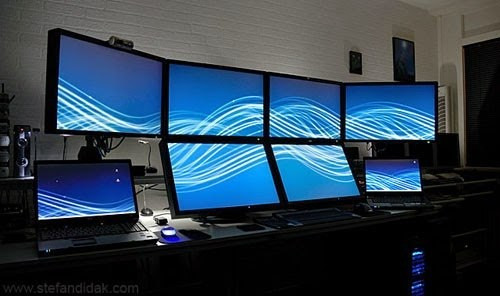
    If you’ve ever used a multi-monitor setup on Windows 11, you might’ve hit a frustrating limitation: the system tray on secondary displays showed the time and date, but clicking it did nothing. For years, to access notifications or the calendar, you had to drag your mouse cursor all the way back to the primary monitor. It was a small annoyance, true, but for productivity users and power users alike, it was a glaring omission. Now, Microsoft is finally addressing it.

    The change comes via the September 2025 update package KB5065789, currently distributed as a non-security preview for Windows 11 version 24H2, and expected to carry forward into 25H2. As part of that, Microsoft has enabled users to open the Notification Center from any connected display by clicking the taskbar’s date/time area. The update also reintroduces the ability to show a full clock (with seconds) within the Notification Center flyout—something many users nostalgic for Windows 10 appreciated.

    This wasn’t just a last-minute addition; Microsoft had already seeded the feature into its Insider Preview builds. For example, build 26200.5722 made the functionality available to Dev/Beta users, along with the calendar flyout and additional clock controls. The Insider blog explicitly described extending Notification Center across displays, including the ability to see calendar and clock on whichever screen you click.

    Beyond that, KB5065789 delivers a host of other small but meaningful tweaks: the update adds “AI Actions” to File Explorer’s right-click menu (offering image editing, visual search, etc.), permits repositioning the on-screen hardware indicators (volume, brightness popups) to different corners or centers, and claims performance improvements in loading context menus in cluttered folders.

    From a user-experience perspective, this rollout suggests Microsoft is gradually restoring or recovering some functionality that was lost or limited when Windows 11 first launched. The multi-monitor fix directly addresses one of the more consistent complaints about taskbar behavior, particularly for people working with multiple screens all day. While the change is not revolutionary, it is meaningful because it removes an unnecessary friction point.

    That said, the feature’s availability is being rolled out incrementally. Not every device will see it immediately, depending on update policies or compatibility holds. But ultimately, for users with two or more monitors, this is a welcomed improvement to workflow and system consistency.

    Share. Facebook Twitter Pinterest LinkedIn Tumblr Email
    Previous ArticleWindows 11 Patch Sparks Major Streaming Headaches
    Next Article Windows 11 Version 25H2 Hits Release Preview with Enablement Package and IT Controls

    Related Posts

    Amazon’s Eero Signal Introduces Cellular Backup for Home Internet Outages

    February 15, 2026

    AI Safety Researcher Resigns, Warns ‘World Is in Peril’ Amid Broader Industry Concerns

    February 15, 2026

    OpenAI Disbands Mission Alignment Team Amid Internal Restructuring And Safety Concerns

    February 14, 2026

    Startup’s New Chip Tech Aims to Make Luxury Goods Harder to Fake

    February 14, 2026
    Add A Comment
    Leave A Reply Cancel Reply

    Editors Picks

    Amazon’s Eero Signal Introduces Cellular Backup for Home Internet Outages

    February 15, 2026

    AI Safety Researcher Resigns, Warns ‘World Is in Peril’ Amid Broader Industry Concerns

    February 15, 2026

    OpenAI Disbands Mission Alignment Team Amid Internal Restructuring And Safety Concerns

    February 14, 2026

    Startup’s New Chip Tech Aims to Make Luxury Goods Harder to Fake

    February 14, 2026
    Top Reviews
    Tallwire
    Facebook X (Twitter) LinkedIn Threads Instagram RSS
    • Tech
    • Entertainment
    • Business
    • Government
    • Academia
    • Transportation
    • Legal
    • Press Kit
    © 2026 Tallwire. Optimized by ARMOUR Digital Marketing Agency.

    Type above and press Enter to search. Press Esc to cancel.